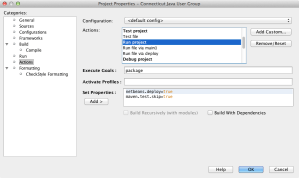
One of the annoying things with Maven is that it runs your unit tests every time a build is done. If you are working on a Java EE application where you are frequently hitting “running” the target to test changes to JSF pages this can get very annoying. With lots of tests this can definitely crimp turn-around time. On the NetBeans Project Properties dialog you can configure NetBeans so that when it invokes Maven for a build/deploy the unit tests are skipped. To do this:
- Choose File | Project Properties
- Select Actions in the Categories list box.
- Add maven.test.skip=true to Run Project, Debug Project, Profile Project
Published by rcuprak
Ryan Cuprak is an e-formulation analyst at Enginuity PLM and president of the Connecticut Java Users Group that he has run since 2003. At Enginuity PLM he is focused on developing data integrations to convert clients’ data and also user interface development. Prior to joining Enginuity he worked for a startup distributed-computing company, TurboWorx, and Eastman Kodak’s Molecular Imaging Systems group, now part of Carestream Health. At TurboWorx he was a Java developer and also a technical sales engineer supporting both presales and professional services. Cuprak has earned a BS in computer science and biology from Loyola University Chicago. He is a Sun Certified NetBeans IDE Specialist. He can be contacted at rcuprak@acm.org.
View more posts
 Ryan Cuprak
You must be logged in to post a comment.